Monday, January 30, 2012
Dry Babe Nightware ~Review~
Women suffer from night sweats for many reasons, hormones, medication, illness, obesity, and many more. Hormones are probably the biggest culprit for women since they can cause heat issues during pregnancy, postpartum, pre-menopause, menopause, and whenever it is "that time of the month". It doesn't matter WHY you suffer, the point is that night sweats can greatly impact all aspects of your life. Night sweats interfere with your ability to get a good nights sleep, because you just can not get and stay comfortable through the night. There are wicking fabrics and wicking night clothes on the market that purport to keep you cool and dry, but they have 2 things working against them. So-called "wicking" fabric requires air flow to work, and air flow is something that is lacking when you are snuggled into bed at night. Secondly, most (if not all) wicking fabrics are 100% polyester. I don't know about you, but polyester does not scream cool and dry to me. I much prefer natural fibers, as they breath and allow more air flow. Dry Babe nightwear was created in an effort to combat these issues.
Their line of women's nightwear currently comes in 5 styles: the Classic Absorbent Chemise nighty, the "Sweet Dreams" Robe, the "Sweet Dreams" Nightgown, "Sweet Dreams" Tank and Boy short, and Dry Babe Absorbent Chemise Nighty. The Classic Chemise is 100% Cotton and ranges is size from small (0/2) to extra-large (12/14). The Dry Babe Absorbent Chemise Nighty and "Sweet Dreams" line are 80/20 Cotton Poly blend terry velours to allow breath-ability, absorbancy, and a bit of stretch. They come in 7 sizes, from small (4/6) to 3X (22W/24W), and in 3 flirty, feminine colors fuchsia, navy, and turquoise. They range in price from $39 to $49 dollars.
As you can see above, I reviewed a "Sweet Dreams" Nightgown in turquoise. Sorry there will be no action shots as you do NOT want to see me in my nightgown, but trust me it fits very well. It is true to size and is quite comfortable. It is designed to fit close to the body so that the absorbency and do its thing. Honestly, I debated whether I wanted to do a review for nightwear when it was offered; it is such a personal thing. I couldn't, however, pass up the opportunity to try out a night shirt that claims to help keep you cool and comfortable at night, especially as frequent sufferer of night sweats. The material lives up to the hype. It is breathable, stretchy, but holds it shape. It is absorbent and I have not woken up once with a wet back while using this product. It does not lose its absorbency when put through a regular wash and dry routine. The nightgown has a flattering but conservative fit. I am 5'10" it it falls about mid thigh on me, so it would be appropriate for tall as well as average height women.
I will probably be getting another nightgown, or maybe even try the tank and shorts next.
You can find Dry Babe on the Web, on Facebook, on Twitter
Brandilyn
Disclaimer: I received the reviewed Dry Babe Sweet Dreams Nightgown for free for purposes of this review. Regardless, I only recommend those products I believe in and think would be a good fit for my readers.
Note: This post may contain affiliate links.
Pin It
Thursday, January 26, 2012
Lovable Labels ~Review and Giveaway~
When you have kids, you have many things that suddenly need to have their name on them. If they go away to camp, or even just go to school or day care, everything that goes with them has to have their name plastered in easy to read letters all over it. It is also helpful if you are every ANYWHERE with other people to have your children's sippies and other possessions labeled; we all know how much the LOVE to sit stuff down where ever they might be standing. The classic way is just to use a marker, but those wear off. Not to mention that they have no fun, no pizzazz. Enter Lovable Labels.
Lovable Labels has been making high-quality labels that stick well and hold up to children's rough and tumble life style since 2003. It was started by a mom just like you and I who needed to label everything in sight and knew there was a need for a durable and fun way to do so.
They make labels for all situations with iron-on labels, slimline labels, labels in fun shapes, labels just for clothes or shoes. They also make Allergy alert labels, bag tags and mini-metal tags (dog tags). Each label can be customized with one of over 40 different icons and come in girl color combos or boy color combos. They have also expanded into household labels and much more.
For this review I received a "Friendship Pack" of labels. That means I got a set of regular, slimline, and fun labels for myself (well my daughter) and a set of slimline labels to share with a friend. The friendship pack has 30 regular labels, 80 slimline labels, and 10 fun stickies. The pack to share has 40 slimline labels. This is a great starter set and contains plenty of labels for your average labeling needs. I don't send my kids to daycare or school outside the home, so I don't have that extra burden, but we do go plenty of places that I want their cups and many other possessions clearly labeled! They have held up well to my 2 year and my 4 year old, are great in the dishwasher, and most importantly they stay put.
Where to find them: Lovable Labels on Facebook, Twitter, and the Lovable Labels Blog
Buy it: Lovable Labels online or by calling 1-866-327-LOVE (5683)
Win it: Lovable Labels has kindly offered one of my readers their own Friendship Pack of labels!
****DISCLOSURE*** The product(s) in this review was provided to me free of cost for the purpose of conducting this review All opinions expressed in the review are my own and not influenced by monetary compensation
a Rafflecopter giveaway
Brandilyn
Note: This post may contain affiliate links.
Pin It
Note: I received one or more of the products mentioned above for free using Mom Blog Society. Regardless, I only recommend products or services I use personally and believe will be good for my readers.(http://momblogsociety.com)
Lovable Labels has been making high-quality labels that stick well and hold up to children's rough and tumble life style since 2003. It was started by a mom just like you and I who needed to label everything in sight and knew there was a need for a durable and fun way to do so.
They make labels for all situations with iron-on labels, slimline labels, labels in fun shapes, labels just for clothes or shoes. They also make Allergy alert labels, bag tags and mini-metal tags (dog tags). Each label can be customized with one of over 40 different icons and come in girl color combos or boy color combos. They have also expanded into household labels and much more.
For this review I received a "Friendship Pack" of labels. That means I got a set of regular, slimline, and fun labels for myself (well my daughter) and a set of slimline labels to share with a friend. The friendship pack has 30 regular labels, 80 slimline labels, and 10 fun stickies. The pack to share has 40 slimline labels. This is a great starter set and contains plenty of labels for your average labeling needs. I don't send my kids to daycare or school outside the home, so I don't have that extra burden, but we do go plenty of places that I want their cups and many other possessions clearly labeled! They have held up well to my 2 year and my 4 year old, are great in the dishwasher, and most importantly they stay put.
Where to find them: Lovable Labels on Facebook, Twitter, and the Lovable Labels Blog
Buy it: Lovable Labels online or by calling 1-866-327-LOVE (5683)
Win it: Lovable Labels has kindly offered one of my readers their own Friendship Pack of labels!
****DISCLOSURE*** The product(s) in this review was provided to me free of cost for the purpose of conducting this review All opinions expressed in the review are my own and not influenced by monetary compensation
a Rafflecopter giveaway
Brandilyn
Note: This post may contain affiliate links.
Pin It
Note: I received one or more of the products mentioned above for free using Mom Blog Society. Regardless, I only recommend products or services I use personally and believe will be good for my readers.(http://momblogsociety.com)
Wednesday, January 25, 2012
*closed* Zoobies Blanket Pets™ Review and Giveaway ~Hosted by Mommy and We~
Review and Giveaway Courtesy of Mommy and We
Can you honestly say you don't LOVE him???
He is so well made. His eyes are fabric, and his seams are all very well stitched. There are a few important points I want to touch on:
- Microbead stuffed head for ultimate squishability™
- Large, super-soft coral fleece blanket zipped inside: 44" x 34"
- L: 13.2" x W: 7.1" x H: 4.9"
- 100% polyester (additional materials) (One of my favorite features because the tag actually says "Made from recycled plastic (PET) bottles")
- Washing-Blanket: Machine wash, tumble dry. Blanket zips off for easy washing.
- Washing-Outer pouch: Spot wash (if machine washed, using a laundry bag designed for delicates is recommended).
- Two bottom hook-and-loop Velcro tabs gather Blanket Pet™ into animal shape.
- Recommended for ages 3 and up, but safely tested for all ages.
Brandilyn
Note: This post may contain affiliate links.
Pin It
*closed* Cook 'n Recipe Organizer Review and Giveaway (and Discount)
I am a Pintrest fanatic... If you have never heard of Pintrest just click on the big "P" in the Social links to the left of this post... but I warn you it is addictive! One of my favorite things about Pintrest is that I can keep all my various recipes that I find online in one place. What I don't like about pintrest is that I have to go online every time I want to see said recipe or I have to print it out to have it "off line". To that end I have been thinking about finding a software program that I could use to organize all my internet yummies into one place. Cook'n Recipe Organizer does just that.
The software is easy enough to install and configure. There is a short video on how to use the software on the website, and I highly recommend new users view this short video. But after that you are off and running. The software also comes with one full cookbook already included. You can add your own recipes (complete with pictures) or just download your favorites from the web. There is a built in web search feature that you use to search for recipes. Once you find the recipe you want, you simply "capture" that recipe and it is imported into your own library. You can tell the software were to categorize the recipe for easy finding later.
Search
Imported Recipe
The software has many more features that allow you to download and print your own "Family" cookbooks, plan menus and grocery lists, adjust recipe portions, share recipes via email or blogs, and sync it all with your tablet or smartphone (with an additional App purchase). My favorite extra feature however, is the nutritional value calculator!
View Recipe
Nutritional Information
Buy it: You can find it at DVO's website or Amazon.com
DVO is offering my readers 50% off the retail price with the code mb-carpenter (good at the DVO website).
Win it: DVO has graciously agreed to give one of my lovely readers their very own copy of Cook'n Recipe Organizer for FREE!! That is an $80 retail value
a Rafflecopter giveaway
Brandilyn
Cook'N logo, video, and (non-screenshot) images are property of DVO Enterprises
Note: This post may contain affiliate links.
Pin It
Note: I received one or more of the products mentioned above for free using Mom Blog Society. Regardless, I only recommend products or services I use personally and believe will be good for my readers.(http://momblogsociety.com)
Monday, January 23, 2012
Growing Culinary Herbs in Containers - Review
Every year I think that I am going to grow my own herbs. Almost every year I manage to FAIL to grow my own herbs. Sometimes the seeds won't start, sometimes I kill them before I ever transplant them, sometimes I don't even start. I have successfully grown herbs 1 time... then I moved across the country and had to leave my herb garden behind. In the 6 years since I have been in my current home, I have yet to successfully grow herbs... but I really want to. So I jumped at the chance to review a book on just that subject from a landscape professional. The book was entitled Growing Culinary Herbs in Containers by Anja Koch (a.k.a Little Miss Greenfingers)
It is a relatively fast read filled with helpful information about just how to successfully grow herbs no matter your gardening situation. The first part of the book covers which herbs grow well in which situations. Some of the situations discussed include direction, indoors or outdoors, container material, and soil quality. The book continues on to let you know which herbs are perennials (will come back year after year) and which are annuals (will need to be replaced each year). Later in the book the author goes into more detail about each herb discussed. The author discusses how to care for your herbs, how to combat disease and bugs. I really enjoyed this part as it is something I always struggle with in my gardens.
My favorite chapter in the book is the one that discusses what to DO with your herbs once they are grown. The one time I did manage a successful herb garden, I had NO clue what to do with all the "extras" I had. Koch discusses how best to harvest, freeze, dry, and use your herbs. She even has instructions on how to make those gourmet herb oils and vinegars as well as herb salts. Can you say yummy? Not to mention that these make GREAT homemade gifts!
Before you finish this book (which can easily be read in a few hours) you will know how to make sure herb garden more attractive, delicious, and useful. I recommend this book to anyone wanting to start their own herb garden, in containers or not!
Buy it: Growing Culinary Herbs In Containers - Healthy & Delicious! (Gardening With Little Miss Greenfingers) Kindle eBook on Amazon
Brandilyn
Image is courtesy of the creator of the product reviewed
Note: This post may contain affiliate links.
Pin It
I received one or more of the products mentioned above for free using Tomoson.com. Regardless, I only recommend products or services I use personally and believe will be good for my readers.
Sunday, January 22, 2012
Couponing The Extreme Video Course ~Review~
Have you ever watched that show "Extreme Couponers" and wondered how they get all that stuff for next to nothing? I recently had the opportunity to catch an episode. I was blown away. I am NOT a couponer. If I happen to have coupons, or my local HEB has store coupons, I will use them, but I have not gone out of my way to find when and where to "best" use a coupon. With 3 kids under the age of 5, I really don't have that much time to shop. When I do make it to a store, it is usually the quickest trip possible and in as few trips as possible.
I recently had the opportunity to review Couponing The Extreme Video Course from Stay at Stay at Home Mom. Honestly, I had no idea what to expect from such a course. It was actually very informative. The course is broken up into 16 video segments (14 for the course plus 2 bonus videos). Each segment is between 3 and 10 minutes long and focuses on one aspect of couponing. Some of the topics include where to get coupons, how to best organize them, how to use them, how NOT to use them. There are also segments on how to use coupons at some popular stores such as Target, Walgreens, and HEB (HEB is used as an example grocery store).
When I first opened the web page and saw just how many videos there were, I was a little intimidated. The course goes by quite quickly, however. Each segment is a well designed presentation with a voice over that is upbeat and pleasant to listen to (without being annoying). Along with the course you get a eBook download and access to a special website with links to all things couponing.
I don't know that I will become an extreme couponer, but I know that many of the tips I picked up from this course will be useful to me in my everyday shopping.
Here is a little overview from Stay at Stay at Home herself.
Brandilyn
All Images owned by the creator of the product reviewed
Pin It
I received one or more of the products mentioned above for free using Tomoson.com. Regardless, I only recommend products or services I use personally and believe will be good for my readers.
Sunday, January 8, 2012
*closed* Review and Giveaway: Rock N Learn
REVIEW WRITTEN and GIVEAWAY BY
Brae Craig at
*****My readers may receive a WHOPPING 25% off their ENTIRE PURCHASE at http://www.RockNLearn.com when they enter the coupon code JQ7711!!!!!!!!*****
What an excellent deal! Please take advantage of this offer!
I am very proud to be the newest reviewer of Rock N' Learn educational videos!!!
About 5 days ago, I received Rock N' Learn's new "Letter Sounds" video in the mail, specifying it's target audience as ages 4-7. I thought this was perfect, since I have children ages 4, 5 and 6! Awesome!!!
As is my usual habit of watching things before I let my kids watch them, I put this into my player after they were asleep.
I have to admit here that I was a bit disappointed. I expected catchy songs (you know, "rock" and learn...kind of implies it.) and lots of music, and some kind of story line. There was SOME music, but it was actually quite tame, a bit quiet, with slow rhythms, and there wasn't much of a story. I wasn't really sure if my kids would get the kick out of it I had hoped.
HOWEVER, after my oldest two got home from school the next day, I put on the video, and to my surprise (AND DELIGHT!) they ALL enjoyed it very much!
(This is a picture of my 1 year old, who, clinging to my legs as I made dinner, heard the video and crawled over to the banister, where he stared at the video, and even bounced a little, dancing along.)
The Rock N' Learn video included several themes.
1. Letter sounds - there were a couple different versions of these.
One was a really long, and fairly monotone song, which I didn't care for, but my children seemed mesmerized by. It said the name of the letter, and then, to a rhythm, made the sound of the letter repeatedly.
Second, a character in the show would read a sentence that was displayed on the screen. In the sentence, every word began with the same letter. There was a 30 second time clock that gave the kids a chance to shout out what the beginning letter was. My kids, who all read by this point (on age appropriate levels) LOVED this part. It gave them a chance to exercise what they knew already, and gave a semblance of interaction with the video.
Third (and my favorite), there was a part (Pictured below) that showed the letter (upper and lower case, which I LOVE because too many videos only show capital. I hate that.) and a picture of an item that begins with that letter's sound. The very BEST part was they also showed a little video of a mouth saying that letter and it's sound. To me, this is the best because it's a very natural way to learn to speak. When babies are learning to talk, they don't just listen to your voice, they watch your mouth to see how you form your words. Don't believe me? Next time you talk to your baby, watch his eyes! You'll be surprised!
Also, I think this is especially cool with kids who mispronounce their letters. Vision trumps sound every time, and they will be drawn to look at the mouth. A child who says the "w" sound for L, or the "th" sound for the "s" might very well figure out how to correctly pronounce a sound by watching this type of thing!
2. Rhyming words - Through the act of a gameshow, the characters on this show changed the first sounds of words to show what rhyming means, and how to do it.
This is something my 4 year old was really interested in. She is reading 1 vowel words already, but rhyming is something they are studying in her preschool class. She loves doing it, and sometimes she gets a bit confused.
3. Blending words.
This section took 2 or 3 syllable words and separated them into sound parts. For example: Clock. 3 squares would appear on the screen, and the narrator would say Cl (Cl would appear in the first box) ah (and an o would appear in the box) ck (and the ck would appear in the 3rd box) Then the boxes would disappear and the word would blend together.
I found this a PERFECT section for my 5 year old. He is in Kindergarten now, and reads wonderfully- if he's not in a hurry. If he's in a hurry, he won't sound out his words, and just guesses. It can get infuriating for a mom when he would rather be playing with his Bat Cave he got for Christmas!!!
4. Spelling
In this part, the narrator would say a word, for example, Golf. She would say "Golf. G- ah-l-f. Golf" - then the 30 second timer would appear again, and give the children a chance to spell the word before the narrator did it. I really liked this because, in breaking it down into sounds, it does teach spelling.
This was for my 6 year old. She's in first grade, and reads on about a 12 year old level. She's still learning, though, the 6 year old age appropriate skills, and doesn't always know how to spell things. The English language can be very confusing. I like that this type of program can better arm her with the ability to think about separating the sounds of a word before she tries to spell it.
Of course, I looked at the website, and I am impressed. Rock N Learn also offers videos on Shapes, Math, Sight Words, Science and Social Studies, and even caters to age specific groups. I would really like to try Math and sight words, as those are things that two or more of my kids are studying at any given time.
I was disappointed at first, but I'm glad I didn't let that get me down- because after seeing how much my kids enjoyed this video, and taking time to realize how well this can benefit them, I really do like the product and I do recommend it.
Now, for the best part of all!!!
Enter the Rafflecopter below for a chance to win YOUR CHOICE of any CD or DVD on www.RockNLearn.com!!! Don't forget, our readers can also receive a 25% discount off of their entire purchase by using the coupon code JQ7711 at checkout! Contest ends at 12:01 am on January 16!
a Rafflecopter giveaway
CarMD Review
I am not your stereotypical woman when it comes to cars. Don't get me wrong, I am far from being a gear head, but I do know the difference between an alternator and a cam shaft (and can tell you the purpose of both). I grew up watching my dad work on cars. He wasn't a gear head either, but he knew enough to save our family money by troubleshooting and fixing most of the easy stuff himself. Heck, I even watched as he rebuilt the head of my 1981 Ford Escort when the head gasket blew out (which was to become a chronic problem with that vehicle, but I digress). I married a man whose dream involves rebuilding a 1969 Plymouth Barracuda from the ground and of course equipping it with a nice Hemi engine. I have spent enough time watching Trucks! and Muscle Car on TNN/Spike with him to understand and appreciate that passion.
But those were the days before on-board computers. Heck, my primary vehicle (a 2005 Toyota Prius) has the potential for problems Henry Ford never imagined. Luckily, we haven't had any major issues with that vehicle, despite over 117K miles. My husband's 2000 Dodge Dakota Quad Cab, however, is another issue entirely. Don't get me wrong, we love that truck and we have had way more good days with it than bad, but it is getting old. It will be 12 years old in April. Being the control freak that I am, I purchased a OBDII Reader a number of years ago to aid in troubleshooting when that dreaded little orange light in the shape of an engine rears its little head on the dash. It was great, we could pull the trouble codes just like the local shops would do (and charge us for in many cases). But spending time trying to Google the codes and figure out what they meant was almost as frustrating as a car mechanic talking down to me because I have breasts and 3 kids in tow.
Enter the CarMD. At it's core it is an ODBII code reader. You can get those from many sources for anywhere from about $50 to hundreds of dollars. What is an ODBII Reader. In simple terms, almost all cars built since 1996 are equipped with a universal trouble code system to aid in problem diagnostics. Even mechanics use them. That is what you get when you take your car in for an "engine light". You (or your mechanic) plug in a device turn the ignition on (do not start the car) and a series of numbers appear on the screen. You can use these codes in many cases to discern what is wrong.
So what made me purchase another reader when I already had one? To tell you the truth, I almost didn't, but the software that came with it intrigued me.
The software is easy enough to install, just like any other software.
Here is how it works (you can click on the images for bigger versions)
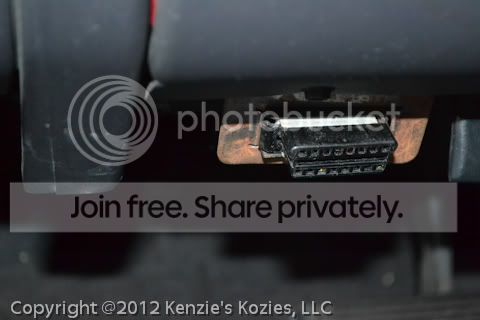
Locate your ODB2 plug receptical. (Usually under the steering wheel/dash)
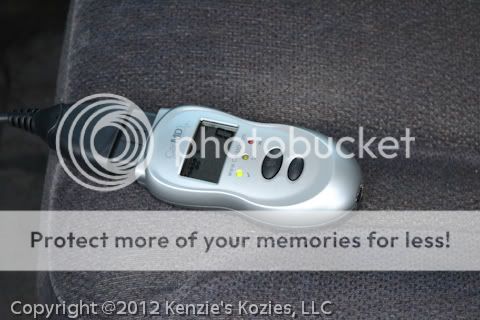
Plug in the CarMD reader. You can plug directly in or use the included extension cable. I used the extension cable so that I could still read what was happening on the display (if I plugged directly in, it was upside down). Then insert the key and turn the ignition to the "on" position (again do not START the vehicle).
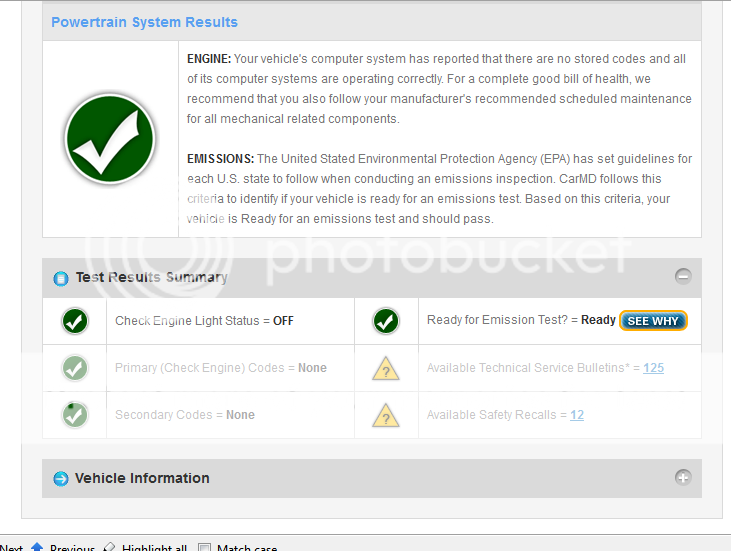
Then you wait. It will say "read" while it is reading. Once it is done, it will have some numbers on the screen (or not if there were no codes to read, as was the case with my Truck). There is also a light system (green, yellow, red) to indicate vehicle health.
You then unplug the reader from the vehicle. Plug in the included USB cable to the reader and to your computer. The display will change to "Data", and the software will be automatically started. If this is the first time you have plugged in the reader, it will take a couple of minutes for the system to install drivers
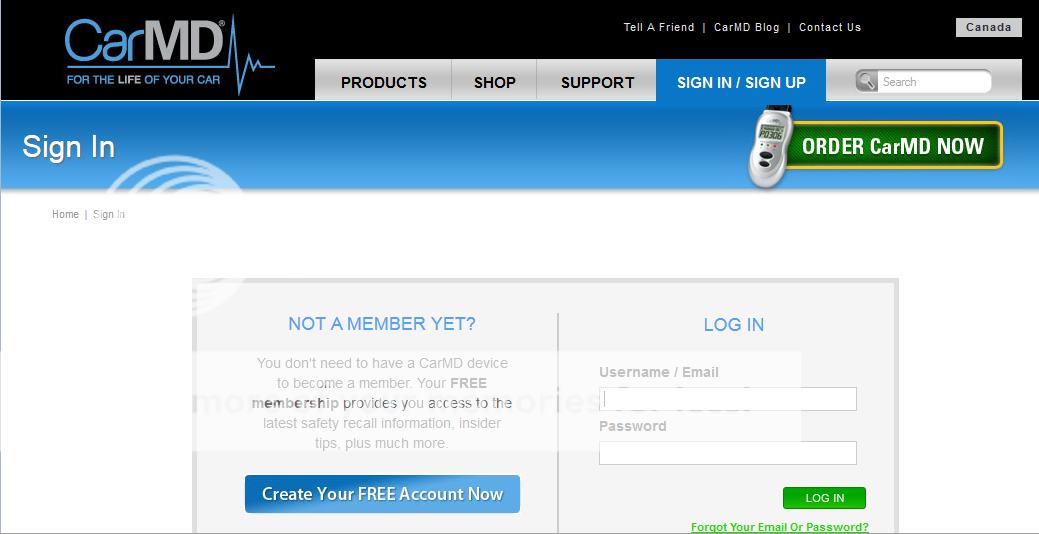
You log-in to the software (which is in your browser). You will need to create a free account if you don't have one already.
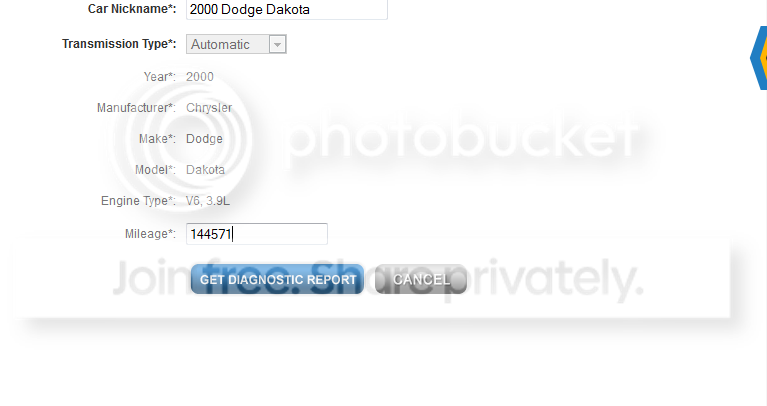
When you create your account you will also tell them what vehicle(s) you have. After the first time you log in, you need only select the vehicle which you are diagnosing. You will enter the currently mileage of your vehicle on the next page. Then a vehicle health report will be displayed
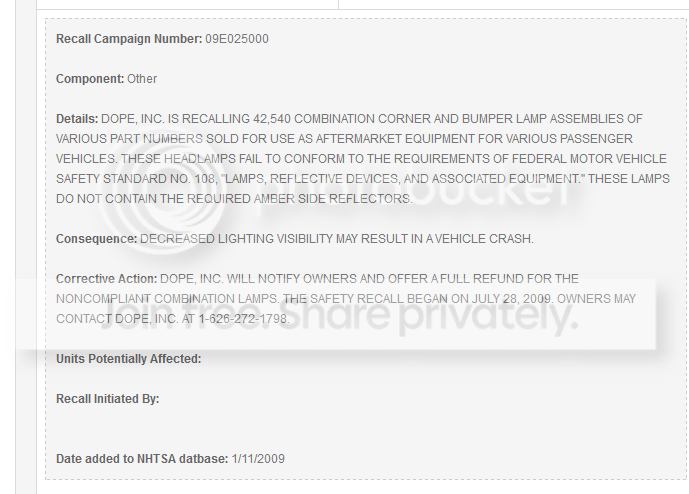
Any found issues will become click-able for further information. In my case, there were only Technical Service Bulletins (TSB) and Safety Recall information. You can select "view" for more information.
The Safety Recall notices are free, but the TSBs cost an additional fee for the full information
If you have actual problems you can also find approximate prices to fix from local mechanics. I can't show you this because we didn't have anything like that on this vehicle.
Overall, I like this product and think it is a good choice for an ODB2 reader. The extras make it very easy to use and don't make it cost that much more.
If you want to purchase it you can do so from many places. There is a $30off special from BzzAgent right now, or it is $99.99 at Amazon.
Note: This product was reviewed as part of a BzzAgent campaign. I received a substantial discount on the item tested and reviewed. My opinions, however, are solely my own (with some editorial review from my husband ;) )
Note: This post may contain affiliate links
Pin It
But those were the days before on-board computers. Heck, my primary vehicle (a 2005 Toyota Prius) has the potential for problems Henry Ford never imagined. Luckily, we haven't had any major issues with that vehicle, despite over 117K miles. My husband's 2000 Dodge Dakota Quad Cab, however, is another issue entirely. Don't get me wrong, we love that truck and we have had way more good days with it than bad, but it is getting old. It will be 12 years old in April. Being the control freak that I am, I purchased a OBDII Reader a number of years ago to aid in troubleshooting when that dreaded little orange light in the shape of an engine rears its little head on the dash. It was great, we could pull the trouble codes just like the local shops would do (and charge us for in many cases). But spending time trying to Google the codes and figure out what they meant was almost as frustrating as a car mechanic talking down to me because I have breasts and 3 kids in tow.
Enter the CarMD. At it's core it is an ODBII code reader. You can get those from many sources for anywhere from about $50 to hundreds of dollars. What is an ODBII Reader. In simple terms, almost all cars built since 1996 are equipped with a universal trouble code system to aid in problem diagnostics. Even mechanics use them. That is what you get when you take your car in for an "engine light". You (or your mechanic) plug in a device turn the ignition on (do not start the car) and a series of numbers appear on the screen. You can use these codes in many cases to discern what is wrong.
So what made me purchase another reader when I already had one? To tell you the truth, I almost didn't, but the software that came with it intrigued me.
The software is easy enough to install, just like any other software.
Here is how it works (you can click on the images for bigger versions)
Locate your ODB2 plug receptical. (Usually under the steering wheel/dash)
Plug in the CarMD reader. You can plug directly in or use the included extension cable. I used the extension cable so that I could still read what was happening on the display (if I plugged directly in, it was upside down). Then insert the key and turn the ignition to the "on" position (again do not START the vehicle).
Then you wait. It will say "read" while it is reading. Once it is done, it will have some numbers on the screen (or not if there were no codes to read, as was the case with my Truck). There is also a light system (green, yellow, red) to indicate vehicle health.
You then unplug the reader from the vehicle. Plug in the included USB cable to the reader and to your computer. The display will change to "Data", and the software will be automatically started. If this is the first time you have plugged in the reader, it will take a couple of minutes for the system to install drivers
You log-in to the software (which is in your browser). You will need to create a free account if you don't have one already.
When you create your account you will also tell them what vehicle(s) you have. After the first time you log in, you need only select the vehicle which you are diagnosing. You will enter the currently mileage of your vehicle on the next page. Then a vehicle health report will be displayed
Any found issues will become click-able for further information. In my case, there were only Technical Service Bulletins (TSB) and Safety Recall information. You can select "view" for more information.
The Safety Recall notices are free, but the TSBs cost an additional fee for the full information
If you have actual problems you can also find approximate prices to fix from local mechanics. I can't show you this because we didn't have anything like that on this vehicle.
Overall, I like this product and think it is a good choice for an ODB2 reader. The extras make it very easy to use and don't make it cost that much more.
If you want to purchase it you can do so from many places. There is a $30off special from BzzAgent right now, or it is $99.99 at Amazon.
Note: This product was reviewed as part of a BzzAgent campaign. I received a substantial discount on the item tested and reviewed. My opinions, however, are solely my own (with some editorial review from my husband ;) )
Note: This post may contain affiliate links
Pin It
Tuesday, January 3, 2012
My Memories Review and Giveaway *closed*
I am a decently crafty person. I love to knit and sew. I dabble in spinning yarn and crochet. One craft I have never been "in to", however, is scrap booking. I just don't "get" sitting at a desk for hours at a time cutting, punching, and gluing little pieces of paper together and little plastic things on to said paper. Then you are left with books and books full of choking hazards that you then have to lug with you every time you move. Since I live in hurricane country, they would inevitably become another thing I would have to evacuate with. Not to mention, I would actually have to print out my thousands of photos ahead of time; forethought is not my strong suit. I am also not a fan of clutter and LOVE keeping my memories and important docs in electronic form (which also makes it easier to share with loved ones far away). As such, I have 3 kids, the oldest of which is now 4, and I don't have a single scrap book page for any of them.
There are lots of sites out there were you can make a semi-custom book from your pictures. I actually took advantage of just such a site for the grandparents for Christmas this year. I, however, am a control freak and those sites just don't give me the control I want. I have looked time and again for a high quality, flexible scrap booking program that was also user friendly and didn't break the bank. After failing in my quest, I got the opportunity to review the MyMemories scrapbooking software.
I jumped at said opportunity, but, let's be honest, I went into this cautiously optimistic. I am pretty picky about software. I am good with software. I can learn how to use anything, but, if they make it too hard, I am not going to bother. To my great satisfaction that was not the case here. The My Memories Suite is very user friendly from the start.
There are quite a few available templates that are free, so I chose one of those. There are also a TON more that are available on the My Memories website for a small price, all of which are easily accessed from within the software itself. I then chose my photos, told it to import them into the template. Since I had more pictures chosen then the template supported, it automatically added on more pages using the same template again. It gives you hints on places to put text (or you can delete the text as I did in most places). You can rearrange the photos to your liking, change the photo layout to another stock layout, or create your own layout. You can also add text and many embellishments. Once you are done, you can export the entire book in many different formats. These formats include DVD movie, CD, digital movie, iPod ready, digital pictures (JPEG, PNG, or PDF), Photo Album, and more.
If you don't want to use a pre-made album template (of which there are hundreds), you can make your own from scratch. The software allows you to easily make whatever size album you want (8x11, 8x8, etc) and you can add to it page by page. There are many built in pages and embellishments, or you can download more from the website (for free or for pay). You can create pages from scratch in a flash. You can do some basic editing on the photos once they are imported so that you get make your page look just right.
Here are a few little pages I made featuring some of my recent knits. (I am a fan of simplicity, but you can get much more complicated than this).
This one I used a built-in paper and photo layout, added "mats" to the pics and ribbon and zig zag embellishments.
This one uses a different built-in "paper", ric rac and bow embellishments, an imprint, and a built-in photo layout. I changed the location of the photo layout, added the "mat" and "shapes" to achieve the purple border and round corners.
I love that you can use it to make your own calendar! I used a built in background and added a photo box, text, an imprint, and a calendar. I then customized the colors and effects on each element. You can then export it as a PDF or print it as an album. Very cool.
You can add music and such to your movie and digital albums, but I chose not to.
Buy it:
Goto the My Memories website. Use the code STMMMS61910 for $10 off your purchase of v3 of the software!
Win it:
Enter the giveaway below, powered by Rafflecopter.
Note:I received one or more of the products mentioned above for free using Mom Blog Society. Regardless, I only recommend products or services I use personally and believe will be good for my readers.(http://momblogsociety.com)
/*{literal}{/literal}*/
a Rafflecopter giveaway
<a href="http://rafl.es/enable-js">You need javascript enabled to see this giveaway</a>.
Pin It
Subscribe to:
Comments (Atom)